


Solana Institutional Access Program: Protocol Onboarding Kit
A short guide for Solana protocol teams on unlocking institutional volume through Fireblocks
Why This Matters for Your Protocol
Institutional users — funds, market makers, exchanges, prime brokers — represent a significant and growing share of Solana volume. Many of them use Fireblocks as their wallet infrastructure, and until recently, one specific limitation kept them from operating with Solana protocols: transactions had to be signed and broadcast within roughly 60 seconds.
For a retail user, that’s plenty of time. For an institution with a multi-signer approval group, it’s often impossible — every signer in the quorum has to review and sign inside that window, or the transaction expires.
The fix is a small, one-time change on your side. Once implemented, your protocol becomes accessible to Fireblocks’ institutional customer base, joining a growing list of Solana protocols already on board:
- Jupiter
- Kamino
- Orca
- Jito
- Marinade
Fireblocks customers using these protocols now operate with 15-minute signing windows, instead of the current 60 seconds. Other protocols will be supported soon..
The Problem in More Detail
Every Solana transaction includes a reference to a recent blockhash. The blockchain rejects transactions whose reference blockhash is older than 150 blocks, or about 60 seconds on average. This is a core Solana design choice for replay protection, and it works well for most use cases.
For institutional workflows, however, it creates a hard ceiling:
- Institutions use Approval Groups, among other security guardrails, to sign transactions. Approval groups can involve 3+ signers, often across time zones.
- Each signer needs time to review the transaction and apply governance controls.
- If the full quorum doesn’t sign within ~60 seconds, the transaction is rejected by the blockchain, regardless of how legitimate it is.
The result: institutions on Fireblocks can’t use Solana protocols effectively, causing them to work around governance controls, stitch together point-solution vendors, or leave Solana volume on the table entirely.
The Solution: Durable Nonce + a Small Protocol-Side Handshake
Durable nonce is a Solana-native mechanism designed for exactly this kind of problem. Instead of anchoring the transaction to a recent blockhash, it anchors to a nonce account that doesn’t expire on a 60-second clock. Transactions using a durable nonce can remain valid for as long as the wallet controlling the nonce allows.
Fireblocks now automatically adds a durable nonce to Solana transactions initiated by our customers over WalletConnect on a select group of protocols. Fireblocks controls the effective expiration on our side — currently 15 minutes by default, facilitated by the WalletConnect relay and extendable to two hours for specific workflows — so the transaction doesn’t sit valid indefinitely.
For this to work end-to-end, protocols need to make a small adjustment. Many protocols today either reject modifications like the durable nonce instruction (treating them as suspicious mutations) or enforce their own short expiration on top of Solana’s. Both behaviors cause Fireblocks transactions to fail even when they’d otherwise be valid.
What You Can Do: Tweak Your Protocol’s Transaction Handling
- When a transaction comes from Fireblocks via WalletConnect, do not reject or invalidate it because a durable nonce has been added
- Extend any protocol-side timeout logic for these transactions — or remove them altogether — Fireblocks handles expiration
That’s it. Everything else about your integration stays the same.
Step-by-Step Implementation
Flow Diagram
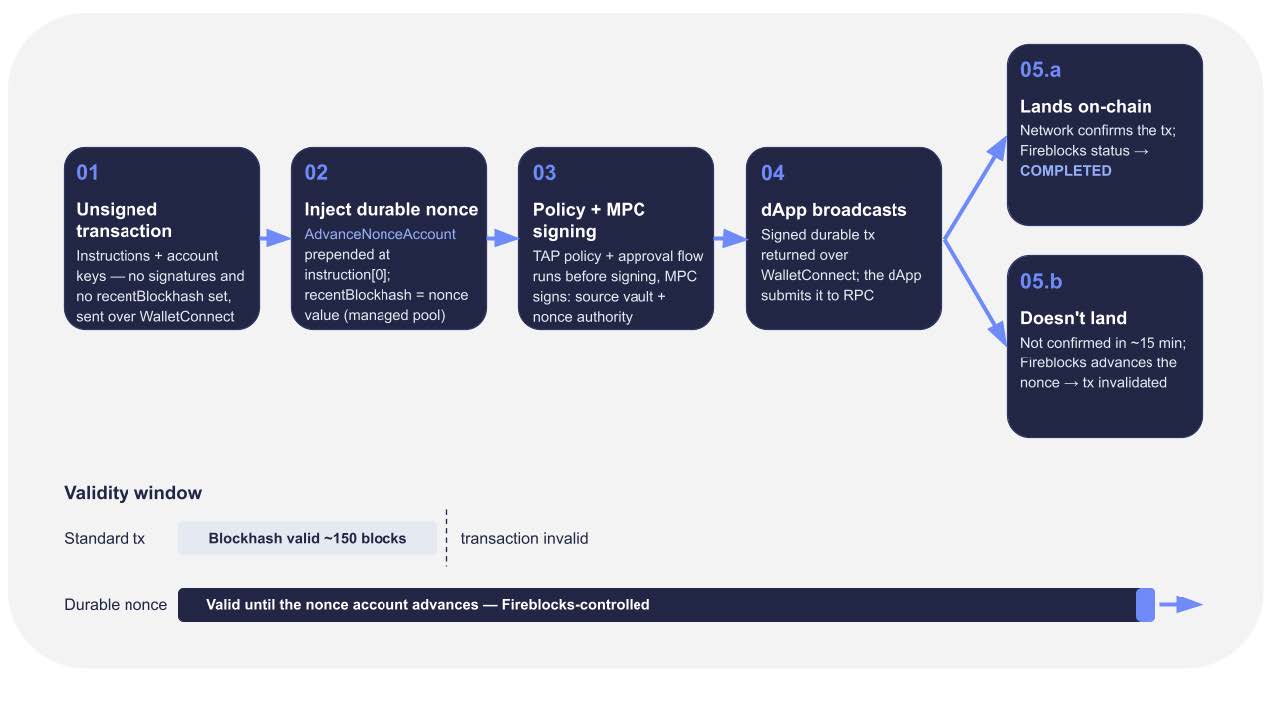
How to identify the Fireblocks transaction?
- During Session Proposal, WalletConnect session exposes the
sessiondata structure with the peer information. In Fireblocks’ case, it will look like this:
peer: {
  metadata: {
    name: "Fireblocks",
    description: …,
    url: …,
    icons: …,
  }
 }
}
- For transactions associated with this session, make sure the following applies:
- Transaction alteration by the wallet, especially addition of the AdvanceNonceAccount instruction, should not invalidate the transaction
- Don’t enforce expiry on these transactions. The WalletConnect session and Fireblocks nonce accounts management will do it for these transactions
- You are all set! Contact the Fireblocks team so we add you to the supported dApps list for testing
Typical implementation time: a few hours to a few days from zero to production, depending on how your transaction validation logic is structured.
Fireblocks can support you during implementation and testing. Get in touch with Daniel Allon, Senior Product Manager at Fireblocks ([email protected]).
Frequently Asked Questions
1. What’s in it for our protocol?
Direct access to Fireblocks’ institutional customer base — funds, exchanges, market makers, and prime brokers who route substantial volume through the platform. Several of these customers have specifically flagged wanting to use protocols that support this. Supporting this implementation signals to institutional users that your protocol is set up for their workflows, alongside protocols like Jupiter, Kamino, Orca, Jito, and Marinade.
2. Does this affect all transactions our protocol handles, or just a subset?
Just Fireblocks transactions coming through WalletConnect. Your protocol can identify these using the WalletConnect session metadata combined with the Fireblocks wallet identifier. All other transactions — retail wallets, other providers, direct integrations — continue to behave exactly as they do today.
3. Why 15 minutes? Can the window be longer?
15 minutes is Fireblocks’ default expiration for durable-nonce Solana transactions, chosen to balance institutional signing workflows against limiting how long any transaction stays valid. For specific workflows, Fireblocks can extend this. In all cases, the expiration is enforced on Fireblocks’ side, so protocols don’t need to configure or manage it.
4. Who else is doing this, and where is it going?
Jupiter, Kamino, Orca, Jito, and Marinade are live. Additional Solana protocols are joining, and Fireblocks is working with the Solana Foundation to make this a broader ecosystem standard. Providers other than Fireblocks may adopt a similar approach over time, so the small integration lift you take on now is likely to serve future partnerships too.
5. Doesn’t durable nonce increase risk?
Durable nonce is a Solana-native primitive, the same way that transactions, accounts, and programs are Solana-native primitives. It’s been used by malicious actors in the same sense that any part of the blockchain stack has been used. The mechanism itself doesn’t represent a vulnerability.
For transactions Fireblocks originates, invalidation logic happens on the Fireblocks side, not your protocol. Fireblocks has defaulted to a 15-minute expiration, extendable to two hours for specific institutional workflows. Transactions do not remain valid indefinitely, and protocols don’t take on any additional risk by allowing them through.
On top of this, Fireblocks transactions go through our policy engine, with governance rules, approval quorums, address allowlisting, and transaction inspection all happening before the signature is even generated. By the time a Fireblocks transaction reaches your protocol, it’s already been through significantly more scrutiny than a typical retail transaction.
6. Who creates and funds the nonce accounts?
Fireblocks. Allocation, funding (rent-exemption), locking, advancing, recycling, and starvation prevention are all owned by Fireblocks. Neither your protocol nor the end user ever creates, funds, or tracks a nonce account.
Get in Touch
If you’d like to implement, we can connect you with the Fireblocks team for the technical walkthrough, testing environment, and any support you need through rollout.
Get in touch with Daniel Allon, Senior Product Manager at Fireblocks ([email protected]).